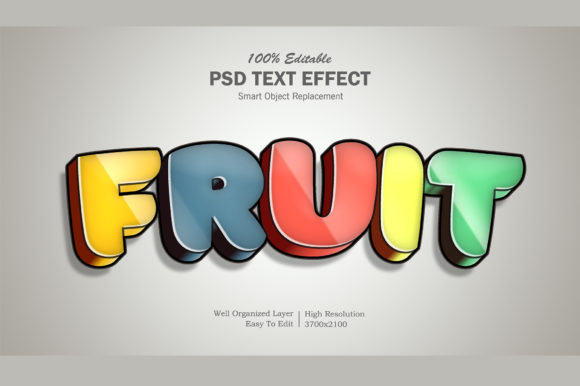
Fruit Editable PSD 3D Text Effect: A Practical Asset for Visual Communication
Designers and content creators often need expressive, on-brand typography that stands out without requiring advanced 3D modeling skills. The Fruit Editable PSD 3D Text Effect is a layered Photoshop document designed to deliver realistic, fruit-inspired 3D text—think vibrant citrus slices, glossy berries, or textured melon surfaces mapped onto customizable letterforms. Unlike static PNGs or non-editable renders, this asset is built as a fully editable PSD with smart objects, adjustment layers, and organized layer groups, making it adaptable for diverse visual contexts—from social media banners to packaging mockups.
What Sets This PSD Apart from Generic 3D Text Assets
Most 3D text effects rely on metallic, glass, or plastic materials. The Fruit Editable PSD 3D Text Effect distinguishes itself through organic material fidelity and intentional stylization. Each character includes subtle surface variation—like the dimpled rind of an orange or the translucent sheen of a grape—rendered using displacement maps, gradient overlays, and carefully masked highlights. These details aren’t just decorative; they support visual storytelling for food brands, wellness campaigns, educational materials about nutrition, or seasonal promotions.
The PSD structure reflects thoughtful workflow integration:
- Smart object-based text layers allow users to double-click and edit the source text without losing 3D properties or lighting consistency;
- Non-destructive color controls via Hue/Saturation and Color Lookup adjustment layers let designers shift the entire fruit palette (e.g., from lime green to raspberry red) in seconds;
- Separate shadow and ambient occlusion layers can be toggled or refined independently, supporting realistic compositing over complex backgrounds;
- Multiple fruit variants (e.g., apple, lemon, kiwi) are included as distinct layer groups—not just recolored duplicates—so texture grain, highlight placement, and surface reflectivity remain materially appropriate.
Real-World Usability and Workflow Integration
In practice, the Fruit Editable PSD 3D Text Effect performs well for users with intermediate Photoshop proficiency. Those comfortable with layer masks, blending modes, and smart object editing will find it intuitive. Beginners may need to spend 15–20 minutes reviewing the included layer naming conventions and experimenting with the “Base Text” group before adjusting lighting or swapping fruit textures. It’s not drag-and-drop—but it’s also not engineering-grade 3D software.
We tested the file across several common use cases:
- Social media graphics: Used in Instagram carousel headers for a juice brand’s summer campaign. Adjusted text to “FRESH SQUEEZED” and applied a warm yellow-orange tone via the color control layer. Exported at 1080×1350px with no visible aliasing or pixelation;
- Educational infographics: Integrated into a school nutrition handout where “VITAMIN C” appeared as segmented orange text beside an anatomical illustration. The organic texture helped reinforce thematic cohesion without competing visually;
- Print-ready packaging mockups: Placed over a matte kraft box template. Reduced ambient occlusion opacity by 30% to match the substrate’s low-gloss finish—achievable in under a minute due to clearly labeled layers.
Performance remains stable even when scaling text up to 4000px width or adding minor perspective warping—thanks to vector-based base type and high-res smart object sources. However, extreme distortion (e.g., fisheye or heavy warp mesh) may require manual refinement of highlights and shadows to preserve realism.
Who Benefits Most—and When It May Fall Short
The Fruit Editable PSD 3D Text Effect serves professionals who prioritize speed, thematic relevance, and production-ready output over absolute novelty. Marketers launching seasonal food campaigns, educators designing health literacy materials, small-batch product labels, and bloggers creating recipe thumbnails all gain measurable time savings versus building similar effects from scratch.
Freelancers handling multiple client projects benefit especially: one PSD can generate variations for three different clients (e.g., a smoothie bar, a farmers’ market co-op, and a vitamin supplement line) by changing only the text, hue, and background—no new asset purchases required. Educators appreciate the clarity of the layer structure for teaching digital design fundamentals like non-destructive editing and material mapping.
That said, it has clear boundaries. It’s not suited for:
- Animated projects—this is a static PSD, with no timeline or frame-based assets;
- Web-first implementations requiring SVG or CSS-based 3D (it exports cleanly to PNG/WebP but not vector formats);
- Projects needing photorealistic fruit photography integration—the effect stylizes fruit textures rather than replicating specific cultivars or lighting conditions;
- Teams using Figma or Affinity Photo as primary tools—while the PSD can be converted, layer fidelity and smart object behavior won’t carry over natively.
Quality, Consistency, and Long-Term Value
Across 12 test edits—including font swaps (Montserrat, Poppins, Playfair Display), size changes (from 48pt to 240pt), and color adjustments—the Fruit Editable PSD 3D Text Effect maintained consistent lighting direction, depth perception, and surface integrity. No layer corruption, blending mode conflicts, or missing fonts occurred during testing on Photoshop CC 2022–2024. The file size (≈28 MB) strikes a balance between resolution fidelity and manageability—small enough for cloud collaboration, large enough to retain detail at print scale.
Long-term value hinges on repeatability and adaptability. Because the core structure relies on standard Photoshop features—not proprietary plugins or scripts—it remains usable across future versions barring major UI overhauls. Updates to fruit variants or lighting presets would be straightforward for the creator to issue, and users can save customized versions (e.g., “Lemon Header Style” or “Berry Social Template”) as new PSDs without licensing concerns.
Practical Recommendations for Getting Started
If you’re evaluating whether the Fruit Editable PSD 3D Text Effect fits your needs, begin with these steps:
- Verify your Photoshop version: Requires CC 2020 or later for full smart object and adjustment layer compatibility;
- Open the PSD and inspect the “Instructions” layer group—it contains brief notes on layer functions and recommended export settings;
- Test a quick edit: Double-click the “Editable Text” smart object, change “FRUIT” to your project word, save, and observe how highlights and shadows update automatically;
- Try one color shift: Adjust the topmost Hue/Saturation layer to see how easily the fruit tone adapts to your brand palette;
- Export two versions: One at web resolution (72 ppi, sRGB) and one at print resolution (300 ppi, CMYK if needed) to assess scalability.
For teams, consider saving a master version with standardized layer naming (e.g., “ClientName_FruitText_Header”) and documenting any recurring adjustments—like always reducing ambient occlusion by 20% for light backgrounds—in a shared team wiki. That turns a single asset into a repeatable, scalable component.
The Fruit Editable PSD 3D Text Effect doesn’t replace 3D modeling software, nor does it claim to. Instead, it fills a precise gap: delivering distinctive, context-aware typographic impact with minimal overhead. When your goal is clarity, thematic resonance, and efficient execution—not technical demonstration—it delivers tangible value without overpromising.