3D Blush Editable PSD Text Effect: A Practical Guide for Designers and Marketers
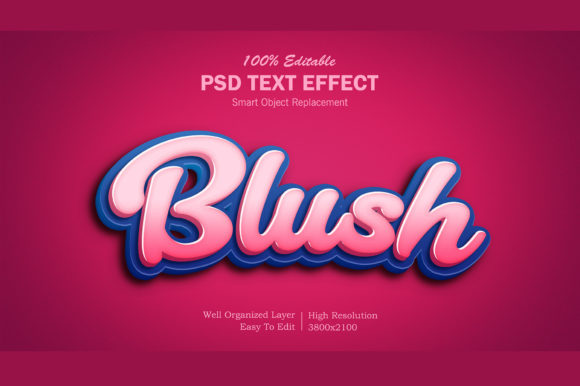
The 3D Blush Editable PSD Text Effect is a layered Photoshop file designed to apply a soft, dimensional, rosy-textured text treatment with full editability. Unlike flat overlays or rasterized effects, it preserves type layers, layer styles, color controls, and 3D-like depth cues—making it suitable for branding, social graphics, packaging mockups, and editorial design where warmth and tactility matter.
What Sets the 3D Blush Editable PSD Text Effect Apart
Its defining traits are structural and functional: it’s built using non-destructive techniques—smart objects, adjustment layers, blend modes, and editable vector-based text. The “blush” element isn’t just a pink tint; it integrates subtle gradients, light-directional highlights, and gentle shadowing that mimic how soft matte surfaces catch ambient light. That gives text a lifelike, almost tactile presence without relying on heavy rendering or external 3D software.
Crucially, every component remains adjustable after download: font, size, spacing, base color, blush intensity, highlight angle, and even the depth perception of the 3D illusion. You’re not locked into a fixed look—you’re given a customizable system.
How It Compares With Other Text Effects
Not all editable text effects deliver the same level of control—or serve the same needs. Here’s how the 3D Blush Editable PSD Text Effect fits within broader categories:
- Static PNG or JPG overlays: These are fast to apply but uneditable beyond placement and opacity. They can’t adapt to new copy, brand colors, or layout shifts—and scaling often degrades quality. The 3D Blush Editable PSD Text Effect avoids those limits entirely.
- Layered PSDs with baked-in textures: Some files include photorealistic skin or fabric textures mapped onto text—but those textures are often flattened or clipped in ways that resist recoloring or resizing. In contrast, the blush effect here uses parametric layer styles and masks, allowing consistent adjustments across projects.
- True 3D-rendered text (e.g., from Blender or Cinema 4D): Offers unmatched realism and lighting flexibility, but requires specialized software, longer render times, and steep learning curves. The 3D Blush Editable PSD Text Effect delivers an accessible approximation—ideal when speed, compatibility, and ease of iteration outweigh photorealism.
- CSS or web-based 3D text: Useful for live sites but constrained by browser support, performance tradeoffs, and limited texture fidelity. The PSD version gives designers full creative control pre-deployment, especially important for print, presentations, or high-fidelity mockups.
Strengths and Real-World Fit
The 3D Blush Editable PSD Text Effect excels in scenarios where tone and approachability matter. Think wellness brands launching a new serum line, lifestyle blogs designing Instagram quote cards, or boutique studios crafting invitation suites. Its warmth supports messaging around care, authenticity, gentleness, or renewal—without appearing saccharine or outdated.
Because it’s built in standard Photoshop (.PSD) format, it works across versions CS6 through current releases—and integrates cleanly with Adobe Creative Cloud workflows. Designers using Illustrator for logos or After Effects for motion can export clean PNG sequences or bring layers in via Photoshop integration.
A practical example: A small skincare brand needed cohesive visuals across Instagram posts, email headers, and product labels. Using the 3D Blush Editable PSD Text Effect, they maintained consistent typography and tactile tone while adjusting blush saturation per campaign—reducing revision rounds and ensuring visual continuity without custom illustration each time.
Tradeoffs and Limitations to Consider
No tool is universal—and understanding where the 3D Blush Editable PSD Text Effect falls short helps avoid misapplication. First, it’s not suited for ultra-minimalist or high-contrast branding systems. The softness that defines it can blur legibility at small sizes or on busy backgrounds. Testing at actual usage scale—especially for mobile UI or packaging thumbnails—is essential.
Second, while editable, it assumes working knowledge of Photoshop layer visibility, blending options, and basic mask editing. Someone unfamiliar with adjusting layer style settings (e.g., changing Bevel & Emboss depth or contour curves) may find initial customization slower than expected. It’s not “one-click magic”—it’s a thoughtful toolkit.
Third, it doesn’t simulate dynamic lighting changes like true 3D tools do. Rotate the text, and the highlight/shadow relationship stays fixed unless manually adjusted. That’s fine for static compositions—but limits use in animated sequences requiring perspective shifts.
When It’s the Right Choice—and When It’s Not
The 3D Blush Editable PSD Text Effect makes sense if you need:
- Consistent, warm, dimensional typography across multiple assets—with tight turnaround times.
- Full control over color, weight, and spatial relationships without leaving Photoshop.
- A middle ground between hand-drawn illustration and industrial 3D rendering—where personality matters more than technical precision.
- Reusable assets for teams with shared design standards but varied skill levels in advanced tools.
It’s less appropriate if you require:
- Animated text with responsive lighting (e.g., rotating headlines in video ads).
- Extensive multilingual support where diacritics or complex scripts distort layer effects unpredictably—testing with your target character set is advised.
- Scalable vector output for large-format printing (the effect relies on raster layers, so extreme enlargement may reveal pixelation).
- Deep integration with CMS or design systems that auto-generate text—since manual layer edits remain necessary per instance.
Making a Grounded Decision
Choosing a text effect isn’t about finding the “best” option—it’s about matching capabilities to constraints: timeline, team expertise, output requirements, and brand voice. The 3D Blush Editable PSD Text Effect sits in a pragmatic niche: it offers more adaptability than static assets, less overhead than full 3D pipelines, and more emotional resonance than generic bevel-and-shadow presets.
If your workflow already centers on Photoshop and your audience responds well to organic, human-centered aesthetics, this effect can streamline production without sacrificing nuance. But if your projects demand scalability across formats, strict accessibility compliance (e.g., WCAG contrast ratios), or frequent animation, evaluating complementary tools—or combining this PSD with other resources—may yield better long-term results.
One final note: always inspect the file structure before purchase or download. Look for clearly labeled layers, documented instructions (even brief ones), and evidence of organized grouping—these signal thoughtful authorship and reduce onboarding friction. A well-built 3D Blush Editable PSD Text Effect should feel intuitive to modify, not decipher.
Practical Next Steps
Before committing, test the effect in context: paste your actual headline into the PSD, adjust the blush intensity to match your brand palette, and preview it alongside supporting imagery. Does the warmth enhance—or compete with—the overall composition? Try exporting at two resolutions: one for screen, one for potential print use. Note where detail holds and where it softens.
You might also compare it side-by-side with a neutral version of the same typeface using only native Photoshop layer styles. That reveals what value the blush effect adds—not just visually, but in terms of time saved, consistency gained, or emotional alignment achieved.
In summary, the 3D Blush Editable PSD Text Effect is a purpose-built resource—not a universal solution, but a considered one. Its usefulness emerges most clearly when matched thoughtfully to both technical reality and communicative intent.